
Perpustakaan UIN Jurai Siwo Lampung
Search Suggestions
Loading...
{{ item.text }}
Search History
{{ tmpObj[key].text }}
Call Number
658.8 Kim bAvailability
My Library
2/2Item Detail (2) - My Library
| Code | Call Number | Location | Status |
|---|---|---|---|
| 202312225 | 658.8 Kim b | My Library | |
| 202312226 | 658.8 Kim b | My Library |
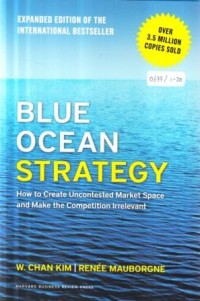
Blue ocean strategy
Description
This global bestseller, embraced by organizations and industries worldwide, challenges everything you thought you knew about the requirements for strategic success.
Now updated with fresh content from the authors, Blue Ocean Strategy argues that cutthroat competition results in nothing but a bloody red ocean of rivals fighting over a shrinking profit pool. Based on a study of 150 strategic moves (spanning more than 100 years across 30 industries), the authors argue that lasting success comes not from battling competitors but from creating "blue oceans"— untapped new market spaces ripe for growth. Blue Ocean Strategy presents a systematic approach to making the competition • irrelevant and outlines principles and tools any organization can use to create and capture their own blue oceans. This expanded edition includes:
1. A new preface by the authors: Help! My
Ocean Is Turning Red
2. Updates on all cases and examples in the
book, bringing their stories up to the present
time
3. Two new chapters and an expanded third
one—Alignment, Renewal, and Red Ocean
Traps—that address the most pressing
questions readers have asked over the past
10 years
A landmark work that upends traditional thinking about strategy, this bestselling book charts a bold new path to winning the future. Consider this your guide to creating uncontested market space—and making the competition irrelevant.
Now updated with fresh content from the authors, Blue Ocean Strategy argues that cutthroat competition results in nothing but a bloody red ocean of rivals fighting over a shrinking profit pool. Based on a study of 150 strategic moves (spanning more than 100 years across 30 industries), the authors argue that lasting success comes not from battling competitors but from creating "blue oceans"— untapped new market spaces ripe for growth. Blue Ocean Strategy presents a systematic approach to making the competition • irrelevant and outlines principles and tools any organization can use to create and capture their own blue oceans. This expanded edition includes:
1. A new preface by the authors: Help! My
Ocean Is Turning Red
2. Updates on all cases and examples in the
book, bringing their stories up to the present
time
3. Two new chapters and an expanded third
one—Alignment, Renewal, and Red Ocean
Traps—that address the most pressing
questions readers have asked over the past
10 years
A landmark work that upends traditional thinking about strategy, this bestselling book charts a bold new path to winning the future. Consider this your guide to creating uncontested market space—and making the competition irrelevant.
Detail Information
- Publisher
- Boston : Harvard Business Review Press., 2015
- Collation
- xxviii, 288 hal. : il. ; 24 cm.
- Language
- English
- ISBN/ISSN
- 9781625274496
- Classification
- 658.8
- Subject(s)
Comments
You must be logged in to post a comment